Introduction
The UB-04 claim form is the standard paper claim that institutional healthcare providers use to bill insurance payers for facility services. Hospitals, skilled nursing facilities, hospice agencies, home health agencies, and similar organizations rely on it to report patient details, services, charges, and diagnoses in one uniform format.
Correct completion matters because a single wrong code, date, or provider identifier can delay payment or trigger a denial. This guide explains what the UB-04 claim form is, who uses it, how the key form locators work, how to complete it step by step, and how to avoid the errors that cost facilities revenue.
What Is the UB-04 Claim Form?
The UB-04 claim form is the uniform institutional claim used to bill Medicare, Medicaid, and most commercial payers for facility based care. It is officially known as the CMS-1450. The terms CMS-1450 and UB-04 are interchangeable throughout the provider community. cms
CMS-1450 Meaning
CMS-1450 is the federal form number. UB stands for Uniform Bill, and 04 refers to the version of the form. The National Uniform Billing Committee (NUBC) designs and maintains the form, while the Centers for Medicare & Medicaid Services (CMS) sets Medicare billing rules for it.
UB-92 vs. UB-04
The UB-04 replaced the older UB-92. The newer form added room for the National Provider Identifier (NPI), more diagnosis codes, and updated data fields that match modern electronic billing standards.
Institutional vs. Professional Claims
Institutional claims report facility services such as room and board, nursing care, therapy, supplies, and drugs. Professional claims report the work of an individual physician or clinician. The UB-04 is for institutional claims, and the CMS-1500 is for professional claims.
Who Uses the UB-04 Claim Form?
Any provider that bills for facility services typically uses the UB-04 claim form.
Hospitals
Hospitals use it for inpatient stays, outpatient visits, emergency care, and observation services.
Skilled Nursing Facilities (SNFs)
SNFs bill covered stays, rehabilitation therapy, and ancillary services on the UB-04.
Rehabilitation Facilities
Inpatient rehabilitation facilities report intensive therapy programs and related services.
Hospice Providers
Hospice agencies bill routine home care, inpatient respite, and general inpatient hospice care.
Home Health Agencies
Home health agencies report skilled nursing, therapy, and aide visits.
Behavioral Health and Psychiatric Facilities
Inpatient psychiatric hospitals and residential programs use the form for stays and therapy services.
Ambulatory Surgery Centers
ASCs use institutional claim formats for facility charges, depending on payer rules.
What Is the Difference Between UB-04 and CMS-1500?
Both forms exist to request payment, but they serve different providers and different types of care.
| Feature | UB-04 | CMS-1500 |
| Claim type | Institutional | Professional |
| Primary users | Hospitals and facilities | Physicians and individual providers |
| Electronic format | 837I | 837P |
| Main coding | Revenue codes, ICD-10, CPT/HCPCS | CPT/HCPCS, ICD-10 |
| Form locators or fields | 81 form locators | 33 items |
| What it reports | Facility services, room and board, ancillary charges | Provider services, procedures, office visits |
Real World Examples
- A hospital bills a three day inpatient stay for pneumonia. The facility uses the UB-04, and the attending physician bills separately on the CMS-1500.
- A primary care physician bills an office visit in a private practice. This is a CMS-1500 claim.
- A skilled nursing facility bills a rehabilitation stay. This is a UB-04 claim.
- A surgeon performs a procedure at a hospital outpatient department. The hospital sends a UB-04 for the facility portion, and the surgeon sends a CMS-1500 for the professional portion.
Facilities that need help with coding accuracy on either form can look at professional medical billing and coding services to keep claims clean before submission.
When Is the UB-04 Claim Form Used?
Inpatient Hospital Services
Admissions, room and board, nursing care, operating room use, labs, imaging, and pharmacy during a hospital stay.
Outpatient Hospital Services
Emergency visits, outpatient surgery, diagnostic testing, infusion services, and hospital clinic visits.
Skilled Nursing and Rehabilitation
Covered SNF stays, physical therapy, occupational therapy, and speech therapy.
Hospice Services
Routine home care, continuous home care, inpatient respite, and general inpatient care.
Home Health Services
Episodes of home care that include skilled nursing and therapy visits.
Other Institutional Services
Dialysis centers, rural health clinics, critical access hospitals, and some behavioral health programs.
What Information Is Included on a UB-04?
The UB-04 claim form groups data into several major categories.
- Patient information: name, address, birth date, sex, and patient control number.
- Provider and facility information: billing provider name, address, NPI, and tax ID.
- Statement dates: the “from” and “through” dates covered by the claim.
- Type of bill: a code that identifies the facility type, care setting, and claim frequency.
- Revenue codes: codes that classify the department or service category that generated a charge.
- Service charges: units, rates, and total charges per line.
- Diagnosis codes: ICD-10-CM codes that explain why care was needed.
- Provider information: attending, operating, and other physicians.
- Patient status: where the patient went after the stay or visit.
- Condition and occurrence codes: extra codes that explain special circumstances and key events.
UB-04 Form Locators Explained
The UB-04 has 81 form locators, often shortened to FL. Each one holds a specific data element. Here are the most important ones.
FL 1: Billing Provider Information
The facility name, address, and phone number. It must match the provider records on file with the payer.
FL 4: Type of Bill
A numeric code that tells the payer what kind of facility submitted the claim, what type of care was given, and whether the claim is original, interim, replacement, or void.
FL 5: Federal Tax Number
The facility’s tax identification number, which must match payer enrollment records.
FL 6: Statement Covers Period
The from and through dates of service on the claim.
FL 42: Revenue Code
A four digit code that identifies the department or type of service, such as room and board, pharmacy, or physical therapy.
FL 43: Revenue Description
A short text description of the revenue code on the same line.
FL 44: HCPCS/Rates
The HCPCS or CPT code for the service, or the accommodation rate for room and board. It can also hold HIPPS codes for certain payment systems.
FL 45: Service Date
The date a service was provided. It is most important on outpatient claims.
FL 46: Service Units
The number of days, visits, or units for the line.
FL 47: Total Charges
The total charge for each line. The page total appears on the final line of the claim.
FL 67: Principal Diagnosis
The main ICD-10-CM diagnosis that explains the reason for care.
FL 76: Attending Provider
The physician with primary responsibility for the patient, reported with NPI and name.
FL 77: Operating Provider
The physician who performed the principal procedure, when applicable.
FL 78 to 79: Other Providers
Additional physicians who played a role in the patient’s care, based on payer requirements.
Form Locator Quick Reference Table
| Form Locator | Field | What It Means | Example | Common Error |
| FL 1 | Billing Provider | Facility name and address | Sunrise Rehabilitation Center | Address does not match payer file |
| FL 4 | Type of Bill | Facility type, care type, claim frequency | 0211 | Wrong frequency digit on a corrected claim |
| FL 5 | Federal Tax Number | Facility tax ID | 12 3456789 | Tax ID does not match enrollment |
| FL 6 | Statement Covers Period | Dates covered by the claim | 03/01/26 to 03/20/26 | Dates outside the admission window |
| FL 42 | Revenue Code | Service category | 0420 | Code does not match the HCPCS code |
| FL 43 | Revenue Description | Text for revenue code | PHYS THERAPY | Description left blank or inconsistent |
| FL 44 | HCPCS/Rates | Procedure code or rate | 97110 | Missing HCPCS where required |
| FL 45 | Service Date | Date of service per line | 03/05/26 | Date outside statement period |
| FL 46 | Service Units | Units billed | 4 | Units do not match documentation |
| FL 47 | Total Charges | Charge per line | 480.00 | Line totals do not add up |
| FL 67 | Principal Diagnosis | Main reason for care | Z47.1 | Invalid or unspecified code |
| FL 76 | Attending Provider | Responsible physician | NPI and name | Missing or wrong NPI |
| FL 77 | Operating Provider | Surgeon for procedure | NPI and name | Left blank when a procedure is reported |
| FL 78 to 79 | Other Providers | Additional clinicians | NPI and name | Missing payer required provider |
Not Sure If Your UB-04 Claim Form Is Filled Out Correctly?
How to Fill Out a UB-04 Claim Form Step by Step
Step 1: Enter Facility Information
Complete FL 1 with the billing provider name, address, and phone number. Add the pay to information in FL 2 if it differs. Enter the tax ID in FL 5 and the billing provider NPI in FL 56.
Step 2: Enter Patient Information
Report the patient name, address, birth date, sex, and control number. Admission date, point of origin, and admission type matter on inpatient claims.
Step 3: Enter Statement Dates
Complete FL 6 with the first and last date covered by the claim. These dates must fit the admission and discharge records.
Step 4: Select the Correct Type of Bill
Choose the code that matches your facility type, care setting, and claim frequency. Confirm payer rules when sending replacements or voids.
Step 5: Add Revenue Codes
Assign the right revenue code to each service line so charges are grouped correctly.
Step 6: Enter Procedure and Service Information
Add HCPCS or CPT codes, service dates, and units that match your documentation and charge master.
Step 7: Add Diagnosis Codes
Report the principal diagnosis in FL 67 and other diagnoses in the remaining diagnosis fields. Use the most specific ICD-10-CM codes supported by the record.
Step 8: Enter Provider Information
Add NPIs for the attending, operating, and other providers as required by the payer.
Step 9: Verify Charges and Units
Compare line totals, units, and rates against billing records. Make sure total charges equal the sum of the lines.
Step 10: Review the Claim Before Submission
Run a final review and scrub the claim for errors. Confirm payer specific rules, timely filing limits, and attachments.
UB-04 Type of Bill Codes Explained
What Does the Type of Bill Code Mean?
The type of bill (TOB) code tells the payer who is billing, what kind of care was delivered, and what the claim represents in the billing cycle.
Type of Bill Code Structure
The code is built from digits on the form. On the paper UB-04, FL 4 shows four characters, with a leading zero. The three meaningful digits are:
- First digit: type of facility, such as hospital, skilled nursing, home health, or hospice.
- Second digit: type of care or bill classification, such as inpatient or outpatient.
- Third digit: frequency, which shows whether the claim is original, interim, replacement, or void.
Common Type of Bill Examples
| TOB | Meaning |
| 111 | Hospital inpatient, admit through discharge claim |
| 131 | Hospital outpatient, admit through discharge claim |
| 211 | Skilled nursing facility inpatient, admit through discharge claim |
| 321 | Home health claim |
| 811 | Hospice, nonhospital based |
| 117 | Hospital inpatient, replacement of a prior claim |
| 118 | Hospital inpatient, void of a prior claim |
Always confirm the correct code with the payer, since some contracts have unique requirements.
Common Type of Bill Errors
- Using the wrong frequency digit when correcting a claim.
- Choosing a facility type that does not match the billing provider’s enrollment.
- Billing an interim claim when a final claim is required.
- Submitting a replacement without the original claim number.
Revenue Codes on the UB-04
What Are Revenue Codes?
Revenue codes are four digit codes that identify the hospital department or category of service connected to a charge. They show payers where the charge came from.
Common Revenue Codes
| Revenue Code | Description |
| 0110 to 0119 | Room and board, private |
| 0120 to 0129 | Room and board, semiprivate |
| 0250 | General pharmacy |
| 0300 | Laboratory |
| 0320 | Diagnostic radiology |
| 0360 | Operating room services |
| 0420 | Physical therapy |
| 0430 | Occupational therapy |
| 0450 | Emergency room |
Revenue Code vs. CPT Code
A revenue code explains where or in what category a charge belongs. A CPT or HCPCS code explains the exact procedure or service performed. On the UB-04 claim form, many lines need both.
Common Revenue Code Errors
- A revenue code that does not match the HCPCS code.
- Missing HCPCS codes on lines that require them.
- Using outdated or invalid codes.
- Sending charges under a department the facility does not operate.
Diagnosis and Procedure Coding on the UB-04
ICD-10-CM Diagnosis Codes
These codes describe the patient’s conditions and the reason for care. The paper UB-04 has space for a principal diagnosis and additional diagnoses, while the electronic 837I allows more.
CPT and HCPCS Codes
These codes describe the services and procedures that were performed. They are reported in FL 44 for most outpatient and ancillary services.
Revenue Codes
Revenue codes group charges by department and service type and tell the payer how to categorize each line.
How These Codes Work Together
The diagnosis explains why care was needed. The revenue code shows which department delivered it. The HCPCS or CPT code shows exactly what was done. Payers compare all three, so mismatches often lead to edits or denials. Facilities that struggle with consistency can reduce risk by working with a medical billing and coding team that audits code alignment.
UB-04 Paper Form vs. 837I Electronic Claim
What Is an 837I Claim?
The 837I is the electronic institutional claim transaction. It carries the same kind of data as the UB-04 in a standardized electronic file.
UB-04 and 837I Relationship
The two share the same underlying billing information, but the formats are different. The 837I has more room. The CMS-1450 has 22 lines for charges, but you can submit up to 9 pages to list charges, while the electronic 837I allows up to 450 charge lines.
When Are Electronic Claims Used?
Most institutional claims are sent electronically. The CMS-1450 can be used to bill a Medicare Administrative Contractor when a provider qualifies for a waiver from the Administrative Simplification Compliance Act requirement for electronic submission. Most other facilities must submit 837I claims to Medicare. cms
Can a UB-04 Be Submitted Electronically?
The paper form itself is not uploaded as a document. Instead, the same data is entered into practice management or billing software, which creates an 837I file that is sent through a clearinghouse or directly to the payer.
How the UB-04 Claim Process Works
The typical workflow looks like this:
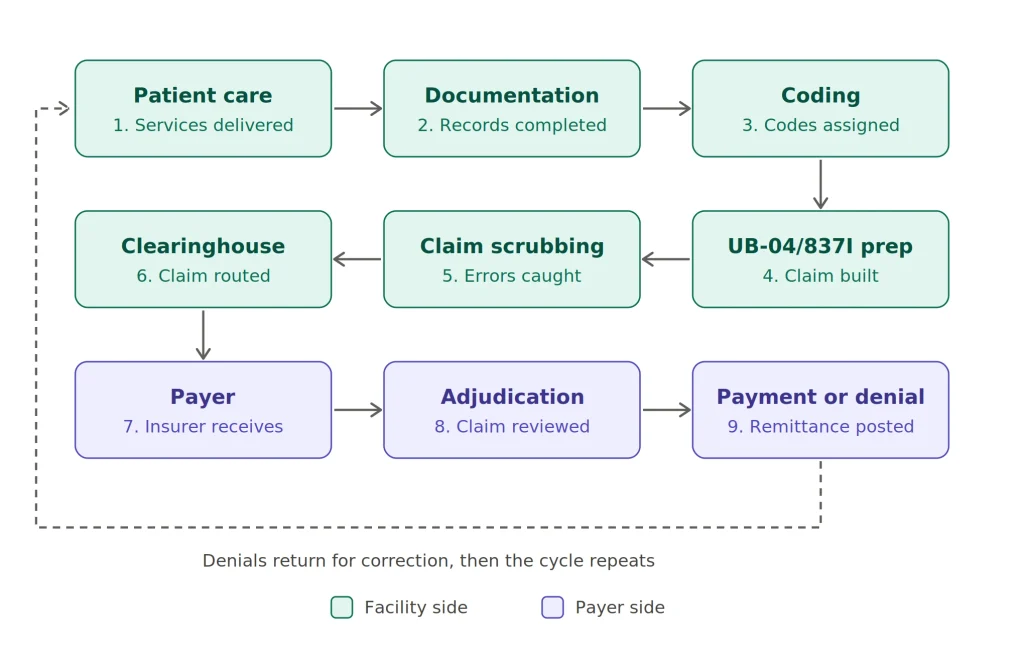
- Patient receives care: services are delivered and charges are captured.
- Documentation: clinicians complete records that support medical necessity.
- Coding: coders assign diagnosis, procedure, and revenue codes.
- UB-04/837I preparation: billing staff build the claim from the coded record.
- Claim scrubbing: software checks for errors, missing data, and payer edits.
- Clearinghouse: the claim is validated and routed to the payer.
- Payer: the insurer receives and logs the claim.
- Adjudication: the payer reviews coverage, medical necessity, and pricing.
- Payment or denial: the facility receives remittance or a denial to work.
For a deeper look at each stage, read our guide on the medical billing process.
Common UB-04 Claim Errors That Cause Denials
Incorrect Type of Bill
A wrong facility type or frequency digit can send the claim down the wrong adjudication path.
Missing or Incorrect Revenue Codes
Charges without a valid revenue code, or with a code that conflicts with the HCPCS code, are often rejected.
Invalid Diagnosis Codes
Truncated, outdated, or unspecified codes fail payer edits.
Incorrect Patient Status
A wrong discharge status, such as home versus skilled nursing facility, can change payment and trigger transfer policies.
Missing Provider Information
Missing attending or operating provider NPIs are a frequent cause of rejection.
Incorrect Dates of Service
Dates that fall outside the admission window or statement period create instant edits.
Charge and Unit Mismatches
Units that do not match documentation or totals that do not add up lead to denials or audits.
Missing Condition or Occurrence Codes
Some claims need these codes to explain accidents, insurance coverage, or other circumstances.
NPI or Tax ID Errors
An NPI or tax ID that does not match payer enrollment is a common and avoidable problem. Billing teams that follow up on rejections quickly, such as a dedicated AR and denial management team, can recover many of these claims.
How to Avoid UB-04 Claim Denials
Use this checklist before every submission:
- Verify patient demographics.
- Confirm payer eligibility and benefits.
- Check the type of bill.
- Validate revenue codes against HCPCS codes.
- Verify diagnosis codes for accuracy and specificity.
- Check the NPI of every listed provider.
- Review admission, discharge, and service dates.
- Validate charges, units, and totals.
- Run claim scrubbing edits.
- Review payer specific requirements.
UB-04 and Revenue Cycle Management
How Accurate Claims Improve Clean Claim Rates
Clean claims pass payer edits on the first attempt. Every correct field on a UB-04 claim form raises the first pass acceptance rate.
Reducing Claim Rejections
Strong front end verification and consistent coding workflows catch errors before the claim leaves your system.
Reducing A/R Days
Fewer rejections and denials mean faster payment and shorter accounts receivable cycles.
Improving Reimbursement
Accurate revenue codes, units, and diagnoses help the facility receive the correct payment for services delivered.
Supporting Compliance and Audits
Consistent documentation and coding create an audit trail that supports each charge on the claim.
UB-04 Claim Form Example
An annotated image of a completed UB-04 claim form works well in this section. Here are the fields to label on the example:
- FL 1: Billing provider name, address, and phone number.
- FL 4: Type of bill code.
- FL 6: Statement covers period.
- FL 17: Patient discharge status.
- FL 42 to 47: Revenue codes, descriptions, HCPCS or rates, dates, units, and total charges.
- FL 56: Billing provider NPI.
- FL 67: Principal diagnosis.
- FL 76: Attending provider.
Highlighting these fields on the image helps readers see how the pieces connect on a real claim.
UB-04 Billing Example
Scenario: A skilled nursing facility submits a claim for a patient’s 20 day rehabilitation stay after a hip replacement. The figures below are illustrative only.
| Element | Example Entry |
| Type of bill | 0211 (SNF inpatient, admit through discharge) |
| Statement dates | 03/01/2026 to 03/20/2026 |
| Revenue code and units | 0120, 20 days of semiprivate room and board |
| Therapy lines | 0420 physical therapy, 0430 occupational therapy |
| Principal diagnosis | Z47.1, aftercare following joint replacement surgery |
| Secondary diagnosis | Z96.641, presence of right artificial hip joint |
| Patient status | 01, discharged to home |
| Provider information | Facility NPI in FL 56, attending physician NPI in FL 76 |
| Charges | Each line shows its own total, and the claim total equals the sum of all lines |
How it fits together: The type of bill tells the payer this is a SNF stay billed as one complete claim. The statement dates cover all 20 days. Room and board units match the 20 day stay, and therapy lines match the documented sessions. The diagnosis supports the need for rehabilitation, and the patient status shows the patient went home. If any one of these elements conflicts with another, the payer may deny or pend the claim.
UB-04 vs. 837I: Are They the Same?
They are closely related, but they are not identical.
- UB-04: the paper claim form and its data structure.
- 837I: the electronic institutional claim transaction.
- Same information: both carry the same underlying institutional billing data.
- Different formats: the UB-04 is a printed form with fixed fields, while the 837I is an electronic file with more capacity.
Common UB-04 Billing Mistakes to Avoid
| Mistake | Why It Matters | How to Prevent It |
| Wrong type of bill | Claim routes incorrectly | Match TOB to facility and frequency |
| Revenue and HCPCS mismatch | Triggers payer edits | Audit charge master regularly |
| Missing NPIs | Causes rejections | Verify provider data before billing |
| Date errors | Immediate denials | Compare against admission records |
| Unit mismatches | Audit risk | Reconcile units with documentation |
| Vague diagnosis codes | Medical necessity denials | Code to the highest specificity |
| Skipping claim scrubbing | Preventable errors reach payer | Run edits on every claim |
Frequently Asked Questions About UB-04
What is a UB-04 claim form?
It is the standard institutional claim form used by hospitals, nursing facilities, hospices, and similar providers to bill payers for facility services.
Who uses the UB-04 form?
Institutional providers such as hospitals, SNFs, rehabilitation facilities, hospice agencies, home health agencies, and behavioral health facilities.
Is UB-04 the same as CMS-1450?
Yes. UB-04 is the common name, and CMS-1450 is the official form number.
What is the difference between UB-04 and CMS-1500?
The UB-04 is for institutional claims, while the CMS-1500 is for professional claims from physicians and other individual providers.
How many form locators are on a UB-04?
The UB-04 has 81 form locators.
What is a Type of Bill code?
A code in FL 4 that identifies the facility type, the type of care, and the claim frequency.
What are revenue codes on a UB-04?
Four digit codes that classify charges by department or service category.
Can UB-04 claims be submitted electronically?
The paper form is not submitted electronically, but the same data is sent as an 837I electronic claim.
What is the 837I?
The 837I is the electronic institutional claim format that mirrors UB-04 data.
What causes UB-04 claim denials?
Common causes include incorrect type of bill, invalid diagnosis codes, missing NPIs, date errors, and unit or charge mismatches.
Who is responsible for completing a UB-04?
Billing and coding staff at the facility usually complete it, based on clinical documentation and charge capture.
Is UB-04 used for Medicare and Medicaid?
Yes. Medicare accepts it when paper claims are permitted, and it is also used for billing institutional charges to most Medicaid State Agencies. Always check state requirements. cms
Can UB-04 be used for outpatient services?
Yes. Hospitals and other facilities use it for outpatient surgery, emergency care, diagnostics, and therapy.
Want Fewer UB-04 Claim Form Denials and Faster Payments?
Final Takeaway
The UB-04 claim form is the core document for institutional billing. It is also called the CMS-1450, and it is used by hospitals, SNFs, hospices, home health agencies, and other facilities to report services and charges. The most important fields include the type of bill, statement dates, revenue codes, diagnosis codes, patient status, and provider NPIs. Accurate coding keeps those fields consistent with each other, and the 837I carries the same data electronically. Clean UB-04 claims lead to faster payment, fewer denials, and stronger revenue.
If your facility wants fewer rejections and faster reimbursement, Ebillient’s billing specialists can help you build a cleaner claims process from start to finish.